Using Chained Functions for Automation Testing with Playwright and TypeScript
Introduction
Welcome to the world of chained functions for automation testing with Playwright and TypeScript. Building on the previously explored PageObject pattern, this topic introduces a powerful and efficient way to streamline your testing workflow.
In this guide, we will dive into the concept of chaining functions, extending the foundation of modular and maintainable automation tests. This approach, combined with the PageObject pattern, will make your tests more readable and considerably more efficient.
See the previous topicIn our earlier exploration, we learned how the PageObject pattern transforms the structure and organization of automation tests by abstracting user interfaces into separate classes, resulting in cleaner and more modular test code.
Now, let's take the next step by introducing chained functions. Chained functions allow you to perform multiple actions on web elements in a sequence, simplifying interactions and improving the readability of your test scripts. They provide a dynamic way to navigate through the various actions required to test your application.
In this guide, we will learn how to create a Control class that enables the chaining of functions to interact with web elements efficiently. We will walk through its implementation, exploring how it simplifies the testing process and enhances the organization of your automation tests.
Let's seamlessly transition from the PageObject pattern into the world of chained functions, building on the foundation laid in our previous discussion.
Step 1: Create the Control Class
In your Playwright project, create a Control class in a new file at ./src/control/control.ts.
import { Locator, Page } from '@playwright/test';

class Control {
    private readonly locator: Locator;

    constructor (private readonly selector: string, private readonly page: Page) {
        this.locator = this.page.locator(this.selector);
    }
}

export default Control;
This class encapsulates methods for interacting with web elements using Playwright's Locator and Page objects.
You can perform actions such as clicking, filling input fields, clearing input fields, and pressing keys within this class. Let's add some of them to our Control class:
import { Locator, Page } from '@playwright/test';

class Control {
    private readonly locator: Locator;

    constructor (private readonly selector: string, private readonly page: Page) {
        this.locator = this.page.locator(this.selector);
    }

    click = async (): Promise<Control> => {
        await this.locator.click();
        return this;
    }

    fill = async (value: string): Promise<Control> => {
        await this.locator.fill(value);
        return this;
    }

    clear = async (): Promise<Control> => {
        await this.locator.clear();
        return this;
    }

    press = async (key: string): Promise<Control> => {
        await this.locator.press(key);
        return this
    }

    getInputValue = (): Promise<string> => this.locator.inputValue();
}

export default Control;
Each method returns an instance of the Control class, enabling you to chain actions together.
Step 2: Use Control in Your PageObject Class
Next, integrate the Control class into your PageObject class. Create instances of the Control class for the elements you want to interact with.
import { Page } from "@playwright/test";
import Control from "../../../control/control";

export class TodoApp {
    public readonly newTodoInput: Control = new Control('header > input', this.page);

    constructor (private readonly page: Page) {}
}

export default TodoApp;
In this example, we create a newTodoInput property using the Control class for the input field where new tasks can be added. This makes it straightforward to interact with this element in your tests.
Step 3: Write a Test Using Chained Functions
Create a test file in your test suite and use the Control instances to chain actions together.
import test, { expect } from './fixtures/fixture';

test.describe('add todo item with chained approach', () => {
    test('add todo item with chained functions', async ({ todoPage }) => {
        const newTodoItem = 'chainedTodoItem';
        const todo = todoPage.todoApp.newTodoInput;

        await todo
            .fill(newTodoItem)
            .then(() => todo.clear())
            .then(() => todo.fill(newTodoItem))
            .then(() => todo.press('Enter'));

        const leftTodoItems = await todoPage.todoApp.getLeftTodoItems();
        expect(leftTodoItems).toBe(1);
    });
});
In this test, we chain actions like filling the input field, clearing it, filling it again, and pressing the Enter key. This approach simplifies the test code and makes it more readable.
Step 4: Run the Test
You can now run your test using Playwright's testing framework. The chained functions approach allows you to perform a series of actions in a more concise and organized manner.
Run your tests with the following command:
npx playwright test
This command executes your Playwright tests based on the configuration in the playwright.config.ts file.
Running 5 tests using 1 worker
5 passed (12.5s)
By following these steps, you have effectively implemented the chained functions approach in your Playwright automation tests, improving code readability and maintainability. This approach is particularly useful when you need to perform multiple actions on the same element within a test scenario.
Conclusion
The chained functions approach in Playwright automation testing offers both strengths and weaknesses that can impact the efficiency and maintainability of your test code.
Strengths
- Improved Code Readability — Chaining functions allows you to express a sequence of actions on a web element in a more intuitive and readable manner.
- Code Reduction — Chaining actions on the same element significantly reduces code duplication, making test scripts shorter and more concise.
- Modularity — Chained functions make it easier to encapsulate and reuse interaction logic. You can build reusable methods or Page Object classes that provide fluent and easily maintainable interfaces.
- Easy Debugging — When a test fails, pinpointing the issue becomes more straightforward because the error is typically associated with a specific chained function.
- Reduced Indentation — Chained functions often lead to shallower indentation, which can enhance code legibility.
Weaknesses
- Limited Parallel Execution — Chaining functions on the same element may not work well when you need to perform simultaneous actions on different elements. In such cases, you may need to break the chain and write separate lines of code.
- Complex Scenarios — For complex test scenarios with multiple elements and interdependent actions, chaining can become convoluted. Separating actions into distinct lines of code may provide better clarity.
- Limited Error Handling — Error handling within chained functions can be challenging. If an action within a chain fails, handling that specific error gracefully may be difficult.
- Learning Curve — The chained functions approach may require a learning curve for team members who are new to this style of test scripting.
- Maintenance Challenges — Overusing chaining for every interaction can lead to overly complex code that becomes difficult to maintain as the application evolves. It is essential to strike a balance between readability and maintainability.
In conclusion, the chained functions approach in Playwright automation testing offers significant advantages in terms of code readability, modularity, and reduced duplication. However, its effectiveness depends on the nature of the test scenarios and the specific use case. Testers and automation engineers should carefully consider when and how to apply this approach to ensure it aligns with the goals of their testing efforts and the complexity of the web application being tested.
Resources
- [1] Full repository with code;
- [2] Page Object pattern;
- [3] Playwright documentation;
In the next topic, we will explore how to use the pipe approach from fp-ts to compose functions and improve the maintainability and readability of Playwright automation tests.
fp-ts, or Functional Programming for TypeScript, is a library that brings functional programming principles to TypeScript. It offers tools for writing code that is more predictable, composable, and concise.
elated topics
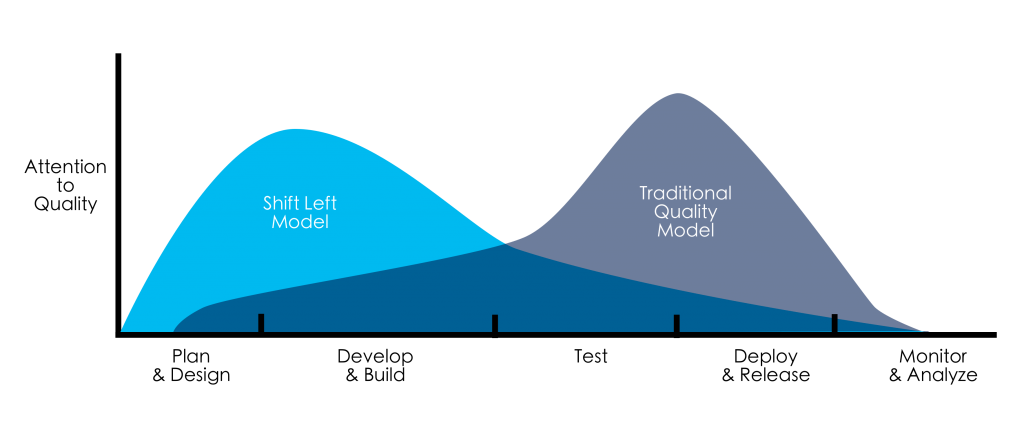
The Power of Left Shifting Testing: Bringing Quality to the Forefront
In the world of software development, ensuring the quality of your product is paramount. Traditionally, testing has been viewed as a phase that occurs after development. However, a paradigm shift is taking place with the adoption of left-shifting testing. In this post, we will explore what left-shif...
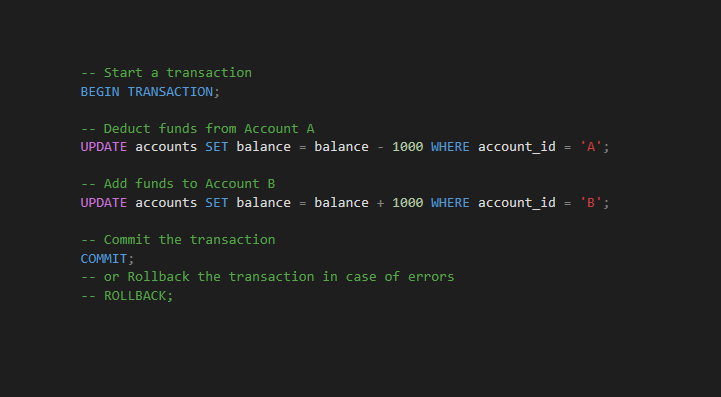
Mastering SQL Transactions: The Power of COMMIT and ROLLBACK in Database Management
SQL transactions are a fundamental aspect of database management that play a crucial role in maintaining data integrity. Among the key components of transactions, the `COMMIT` statement stands out as a linchpin for ensuring that changes made to a database are permanent. In this post, we will explo...

🌟 Functional Programming in Automation Testing with TypeScript and Playwright 🤖🚀 Part II
Welcome to the second part of our exploration into functional programming in automation testing. In this continuation, we will delve deeper into the practical implementation of the concepts we've discussed so far. Here's what you can expect in this part: Here are step-by-step instructions for i...